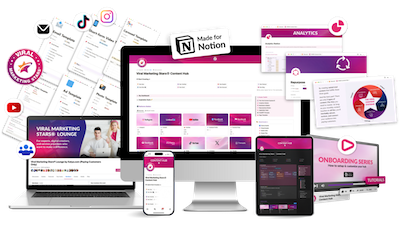
The Viral Marketing Stars® Content Hub is a $69.99 Notion template that helps content creators organize their posts, ideas, and brand assets in one place. It works best for people who already create content regularly but struggle with scattered notes and inconsistent posting, offering helpful templates, a repurposing system, and a 6,000-member Facebook community for support.
While the creator of this product promises viral growth and big income gains, the product is really just a well-designed organizational system that requires manual input and won’t automatically post or grow your audience for you. You’ll still need design tools, scheduling apps, and most importantly, the discipline to actually create and post content consistently. The hub makes sense if disorganization is your main problem, but if you’re struggling with what to post, how to grow an audience, or finding time to create, this template won’t solve those deeper challenges.
Who This Product Serves Best
The Content Hub really shines for content creators who already post regularly and want to level up their organization. If you’re the type who has brilliant ideas scattered across different apps and voice memos, this brings everything together beautifully. Small business owners who manage their own social media will find this especially helpful for staying consistent.
This works wonderfully for people creating content across multiple platforms who want to make the most of their work through smart repurposing. If you’re comfortable with project management tools and excited to learn Notion, you’ll get the most value here.
When to Consider Other Options
This might not be the right fit if you’re just starting with content or only post occasionally. The Hub works best when you have content to organize. If you’re looking for something that automatically publishes your posts, you’ll want to pair this with scheduling tools like Buffer or Later.
For those new to Notion, there’s definitely a learning curve. The included tutorials help a lot, but it’s good to know this going in so you can set aside time to learn.
What Works Really Well
The templates are genuinely helpful for beating blank page syndrome. Having formats ready for different post types speeds up creation time significantly. The repurposing station stands out as particularly valuable – it guides you through turning one piece of content into multiple formats, which smart creators do but many struggle with.
Centralizing everything beats the chaos of multiple browser tabs and scattered notes. The system thoughtfully includes spaces for brand assets like colors, fonts, and frequently used links. These details often get lost, so having a dedicated home makes a real difference.
The pricing offers solid value. At $69.99 for lifetime access, you’re investing less than most monthly subscriptions cost. Plus, the Facebook community of 6,000 creators becomes a valuable resource for feedback and fresh ideas.
Areas to Understand Before Buying
It’s helpful to know this is essentially a sophisticated Notion template. Tech-savvy users could create something similar, but most people benefit from having it done professionally. Think of it like buying a meal kit instead of hunting down recipes – you’re paying for convenience and expertise.
The analytics feature requires manual input, which actually helps some creators stay more connected to their numbers. While automatic tracking would be nice, manually reviewing your stats monthly can provide better insights than passive tracking.
The “viral” messaging is aspirational. While organization helps consistency, and consistency helps growth, the system itself is really about workflow improvement. Set realistic expectations about what organization alone can achieve.
Important Considerations
Notion performs best with moderate-sized databases. If you’re planning to store thousands of content pieces, you might notice some slowdown. Starting fresh and archiving old content periodically helps maintain speed.
The mobile experience works but shines on desktop. Many successful creators do their planning on computer and quick captures on mobile, which aligns well with how this system functions.
The lifetime updates apply to the template itself. Since this runs on Notion’s platform, changes to Notion could affect functionality. This is standard for any third-party template but worth knowing.
Setting Realistic Expectations
The sales page’s income projections assume you’re already converting posts to sales. For creators still building their audience, focus first on the organizational benefits. The financial returns come from consistent posting over time, not immediately.
The “3 leads per post” metric represents established creators’ results. New creators should celebrate any engagement while building toward these numbers. The system helps you track progress, which matters more than hitting specific targets right away.
Your Complete Content Setup
This hub forms the foundation of a content system. You’ll complement it with:
- Design tools (many creators love Canva’s free version)
- Scheduling tools (start with free options like Facebook Creator Studio)
- Basic analytics (free platform insights work fine initially)
- Simple video tools (even phone apps work)
Building your toolkit gradually keeps costs manageable while you grow.
The agency license at $500 yearly makes sense once you’re managing client content professionally. Solo creators can ignore this unless they expand to client work.
Our Recommendation
The Content Hub delivers exactly what it promises – a comprehensive organization system for content creators. For those drowning in content chaos, it provides immediate relief and structure. The key is matching the solution to your actual challenge.
Consider it like investing in a high-quality planner. The planner itself won’t make you productive, but if disorganization is blocking your progress, the right system removes that barrier. Many creators find that better organization naturally leads to more consistent posting.
Ask yourself: “Is lack of organization currently limiting my content creation?” If yes, this $69.99 investment could pay for itself quickly through time saved and consistency gained. If your challenges lie elsewhere (like idea generation or audience building), address those first while keeping this system in mind for when you’re ready.
The creators who succeed with this hub use it as a launching pad, not a magic solution. They appreciate how professional organization supports their creative work rather than expecting it to replace the work itself. With realistic expectations and consistent use, it becomes a valuable part of a thriving content practice.
Bonus: Creative Strategy Audit
When you buy this product using our link, email a screenshot of your receipt to hello@dropkickcopy.com and we’ll buy you a Creative Strategy Audit. This includes a 30-minute consultation and an in-depth audit of your brand to help you define a clear and specific creative strategy. So you can make the most of your purchase.
Other products from Viral Marketing Stars®: